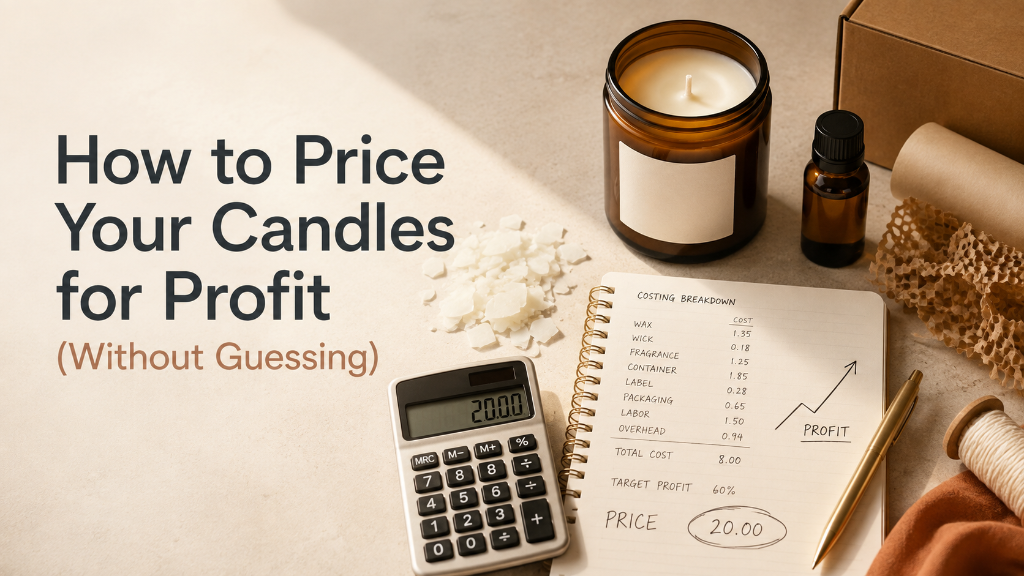
How to Price Your Candles for Profit (Without Guessing)
Why most candle makers underprice their candles
If you've ever finished a batch of candles and wondered "am I actually making money on these?" — you're not alone. Most small candle businesses price by guessing, by copying a competitor, or by using a rough "wax + fragrance + jar + a bit extra" formula that quietly ignores labour, overheads and waste.
The result is predictable: candles sell, but the profit left over never matches the hours you put in. In this guide we'll fix that by walking through a real candle costing and pricing workflow using the tools built into Pour Logic — the candle business workspace that calculates your candle material costs, production labour, overheads, wholesale prices and profit margins for you.
1. Calculate your true material cost per candle
Profitable candle pricing starts with an honest candle cost calculator. In Pour Logic, every candle lives in the Candles section as a recipe. Each recipe lists its ingredients — wax, fragrance oil, wick, vessel, label and any additives — with the exact quantity and unit cost.
Pour Logic pulls those costs directly from your Materials inventory, where every material already has a cost per unit worked out from your bulk purchase (total paid ÷ quantity bought). That means when you add 200g of soy wax to a recipe, the recipe cost updates instantly using the real price you paid — not a guess.
How to use it:
- Open Candles and create or open a recipe.
- Under Ingredients, add each material and enter the quantity used per candle.
- Pour Logic totals the material cost per candle automatically.
Tip: if you buy a new batch of wax or fragrance at a different price, update the bulk cost in Materials and every recipe using that ingredient recalculates — so your pricing always reflects what you actually paid.
2. Add your labour — fixed or hourly
Time is the cost candle makers forget most often. Pour Logic lets you account for labour two ways on each recipe:
- Fixed labour cost: a set dollar amount per candle (great when your process is consistent).
- Hourly labour: enter your hourly rate and estimated production time per candle, and Pour Logic multiplies them for you.
You can track realistic production time in the Production section using the burn test lab and production planner, so the hours you enter are based on how long things actually take — not wishful thinking.
Material cost + labour = your true cost to make one candle. Everything you charge above this is margin.
3. Factor in overheads so they don't eat your profit
Materials and labour are only part of the story. Your candles also carry a share of overheads — electricity, insurance, labels, packaging, market stall fees, software, and the "hidden" costs like wax wasted from a bad pour or a fragrance that discolours.
Pour Logic's Budget section is where you record these running business expenses. The Price Analytics tool (under Budget) then layers your overheads on top of recipe costs so you can see your true net profit per candle — not just the gross margin you'd get from a simple markup.
When overheads are included, you'll often discover that a candle you thought was profitable at a 3× markup is actually barely breaking even once fees and waste are accounted for. That's the insight that turns pricing from guesswork into a business decision.
4. Set wholesale and retail prices that actually work
Once you know your true cost, pricing becomes a multiplier — not a guess. Every Pour Logic recipe has two built-in multipliers:
- Wholesale multiplier — applied to total cost for your wholesale price (commonly around 2×).
- Retail multiplier — applied to total cost for your retail/DTC price (commonly around 3×).
Change either number and Pour Logic recalculates both prices instantly. You can also turn on uniform collection pricing so every candle in a collection shares one price (based on the most expensive candle), and optionally round retail prices up to the nearest $0.05 for cleaner shelf pricing.
How to use it:
- On any recipe, set the wholesale multiplier and retail multiplier.
- Toggle uniform collection pricing if you want a consistent collection price.
- Toggle round retail price for tidy consumer pricing.
Now you have a wholesale price you can confidently send to stockists and a retail price for your website or markets — both grounded in your real numbers.
5. Read your profit margins (and test scenarios)
A price is only good if it leaves a healthy margin. Pour Logic's Price Analytics dashboard shows your gross profit and net profit per candle, by collection, with overheads included.
Even better, the built-in price simulator lets you adjust prices and sales volume and instantly see how each change affects your total profitability — so you can answer questions like "if I drop this candle's retail price by $2, how many more do I need to sell to stay ahead?" without a spreadsheet.
For deeper insight, the COGS & Tax Export report (also under Budget) rolls up your cost of goods sold by quarter or financial year — useful at tax time and for understanding your true annual margins.
6. Keep costs honest with price trend tracking
Wax and fragrance prices move. Pour Logic watches them for you: the Price Trends tool tracks ingredient cost history, and Price Watchlist alerts you when a supplier price rises above a threshold you set. When costs creep up, you'll know — and can adjust your multipliers before your margin quietly disappears.
The full pricing workflow in Pour Logic
- Materials: record bulk purchases so cost-per-unit is always accurate.
- Candles (recipes): add ingredients + labour to get true cost per candle.
- Set multipliers: wholesale (≈2×) and retail (≈3×) — uniform and rounding optional.
- Budget & Price Analytics: layer in overheads and read net profit.
- Simulate: test price and volume scenarios before you commit.
- Watch trends: get alerted when ingredient costs rise.
Stop guessing and start pricing for real profit. Pour Logic brings your candle costing, production, inventory and pricing into one workspace — so every price you set is backed by your actual numbers.
Start my 7-day free trial → No credit card required.
Topics & keywords
Stop guessing your profit margins.
Pour Logic calculates your recipes, costs, batches and profit — all from one workspace.
7 days free · No credit card required
0 Comments
No comments yet — be the first to share your thoughts.